Data Model
How the data is structured: the EspoCRM entity model, the application's own database tables, and the boundary between them.
How the data is structured
How the data is structured across the two databases this platform uses. Drawn from the application source rather than from documentation, and current as of 21 August 2026.
The two stores
EspoCRM is the system of record for every person, company and relationship, and it also enforces every permission — the application reads and writes as the signed-in user, never as a super-user. A Postgres database holds what the CRM cannot: durable capture of incoming submissions, delivery retry state, staff collaboration notes and cached analytics.
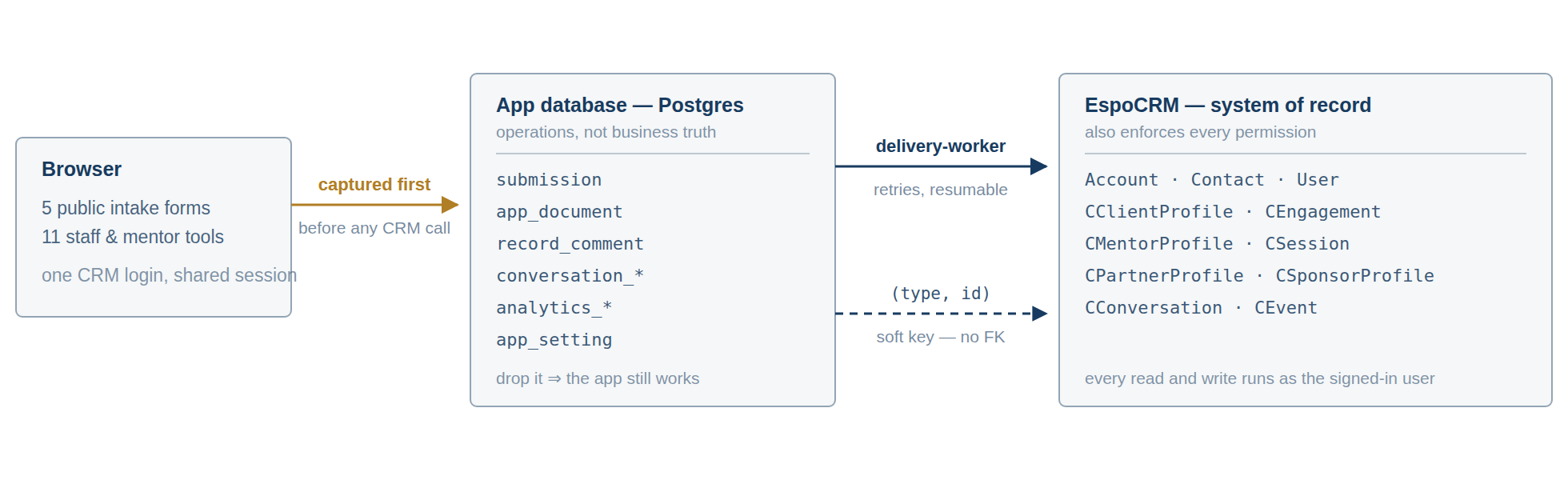
Two properties follow from this shape. A submission is safely stored before the CRM is ever contacted, so a CRM outage costs nothing. And application rows name CRM records by type and id rather than by a database foreign key, so the two databases can be backed up, restored and reasoned about separately.
The client spine
Everything starts with two built-in entities — Company (called Account internally) and Contact — plus three custom hubs that record what kind of relationship CBM has with them. An Engagement is one mentoring request; a client can have many over the years, all hanging off a single Client Profile.
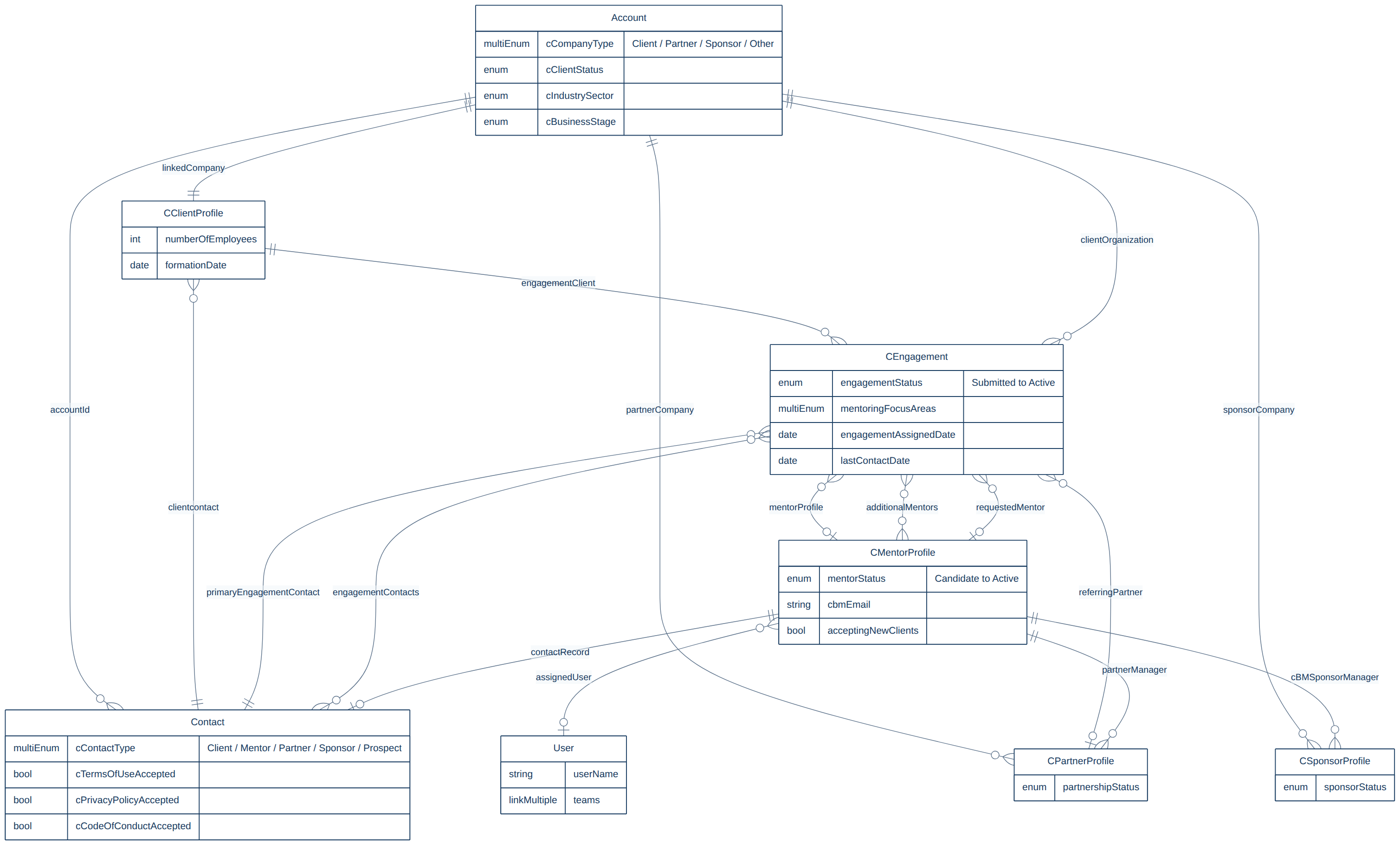
A mentor is a Contact, plus a Mentor Profile, plus — once approved — a CRM User to sign in with. That chain is why a mentor whose profile is not assigned to their User account sees an empty grid in the session tools: the app finds "me" by walking User to Mentor Profile, then out to the records they manage.
Type fields. Company type is cCompanyType and the funder value is Sponsor. These are multi-select fields, and EspoCRM rejects an invalid value outright — the record is not created at all, rather than created with the field left blank.
Sessions and contributions
Client Management, Partner Management and Funder Management look like three applications and are in fact one. All three write the same Session entity; only the link back to the parent record differs.
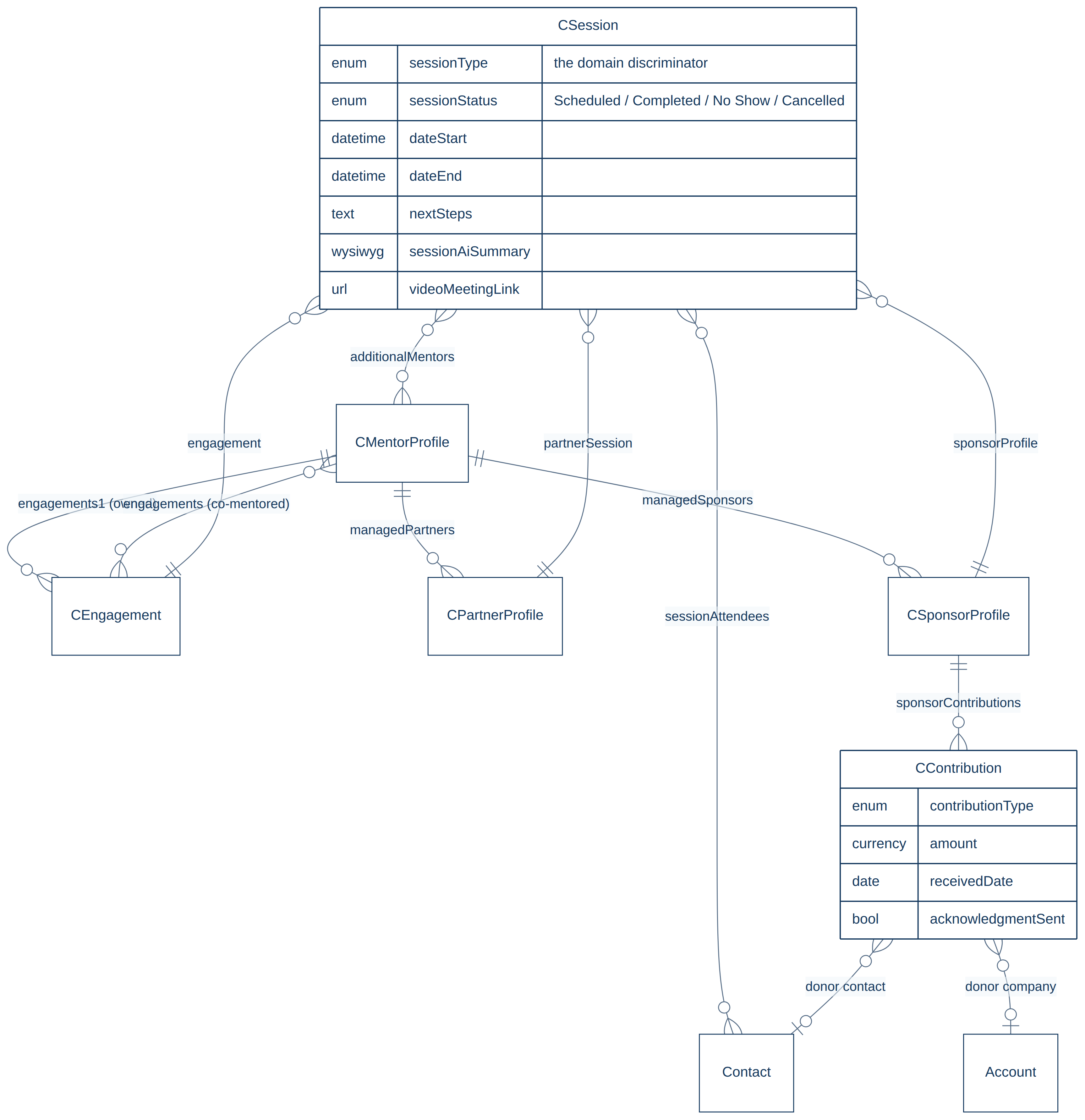
The three links on a manager profile — owned engagements, managed partners and managed funders — are the whole ownership model. Changing the manager on a partner or funder record is what moves it between people.
A Conversation is one email thread and holds many Communication records, one per message. A thread can be attached to several records at once, which is how the same exchange appears on an engagement and on each contact taking part in it.
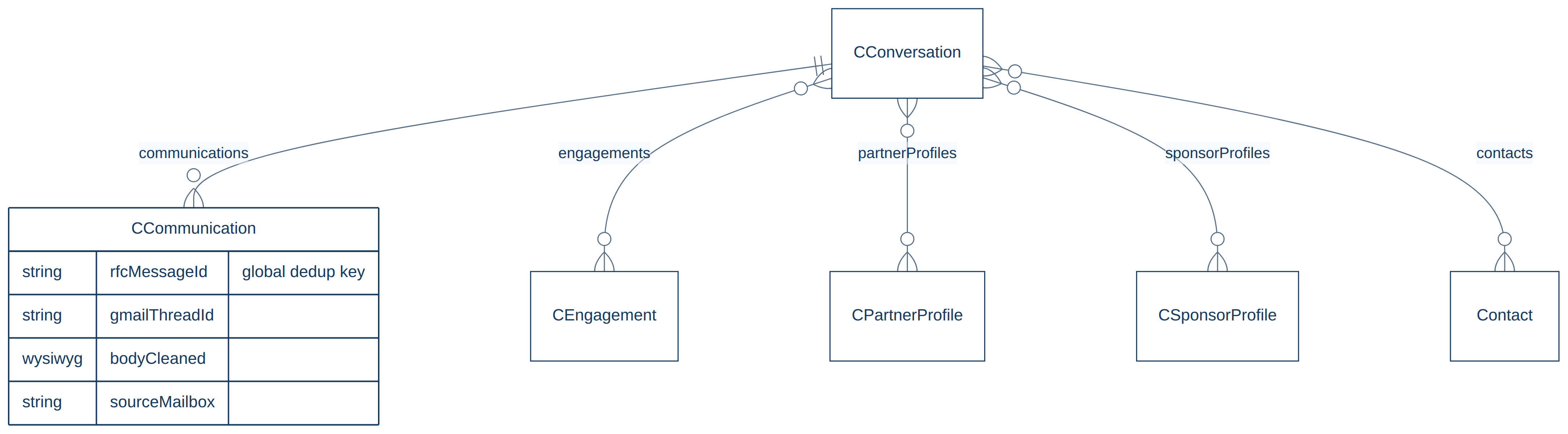
Messages are matched across mailboxes by their RFC Message-ID, so a thread that reaches two CBM mailboxes is stored once, not twice.
Receipts, enquiries, events and the audit trail
The rest of the model hangs off the spine rather than sitting inside it. Every arrival of any kind gets an Intake Submission receipt, updated in place as its status changes.
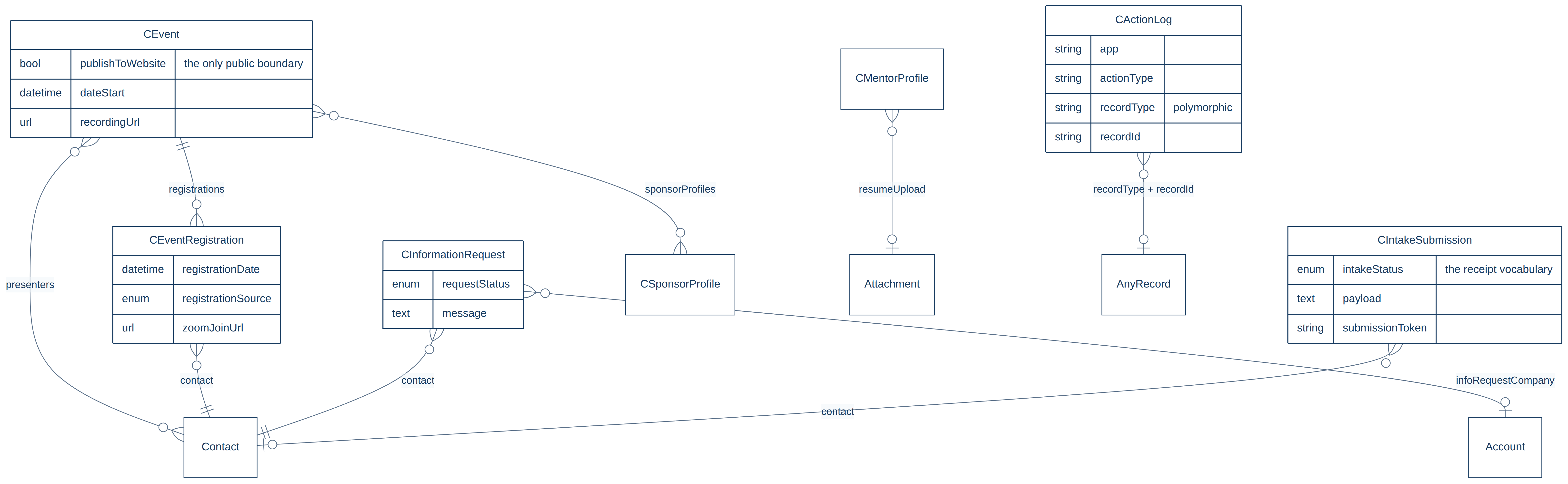
The Action Log names its subject by type and id rather than by a fixed link, so one entity can record staff actions taken against any record anywhere in the system.
Events do double duty. The Event entity is also CBM’s internal calendar — most rows are team meetings and mentoring-session mirrors. The publishToWebsite tick box, off by default, is the entire boundary between those rows and the public website.
The application database
Eighteen tables, in five groups: durable capture and the staff queue around it, Gmail sync state, the Google Drive document index, analytics definitions and cache, and runtime configuration. Only the submission group has real foreign keys.
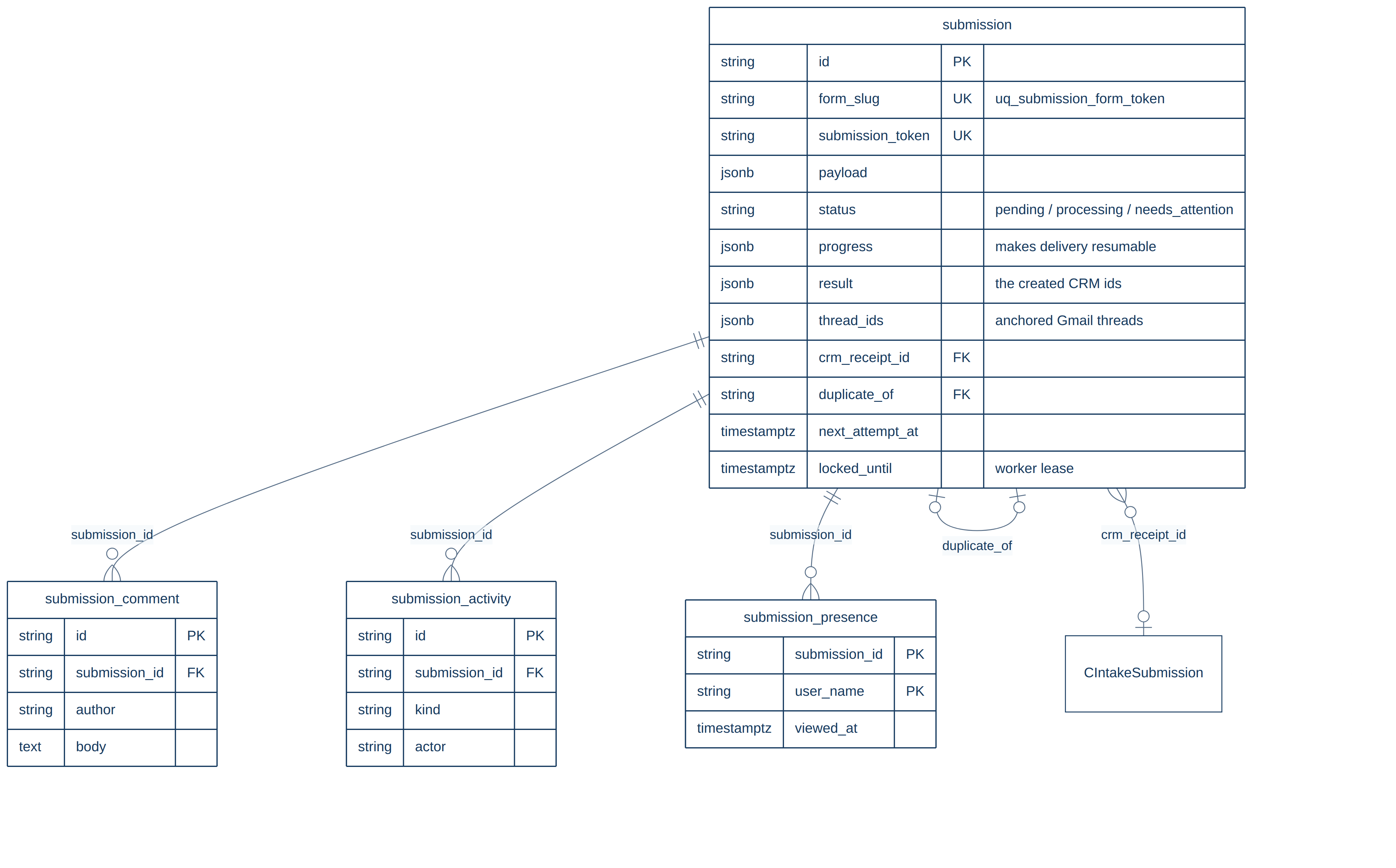
The unique key on form and token is the safeguard against double submission: a form submitted twice cannot produce two rows. Because the worker records each CRM record as it creates it, a retry resumes a half-finished sequence instead of duplicating it.
The remaining tables carry no foreign keys to one another. They reach into the CRM by naming a record type and id.
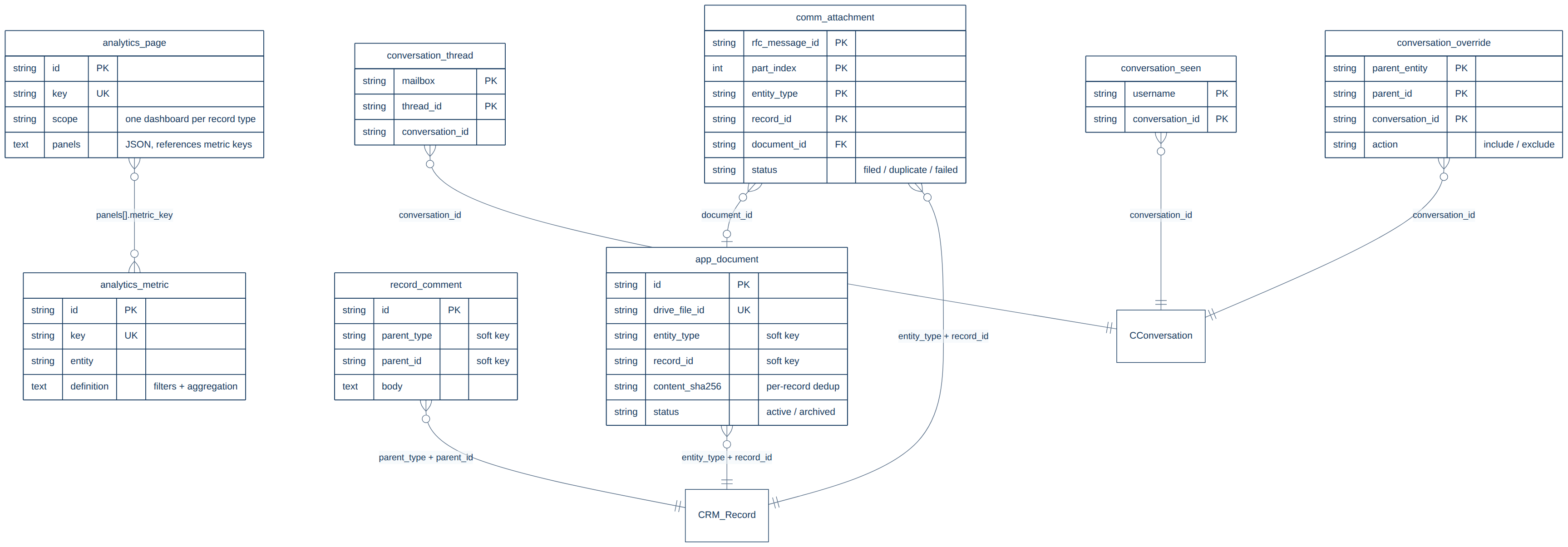
Nothing here is business truth. Delete this database entirely and the application falls back to writing straight to the CRM.
What each public form creates
| Form | Records created, in order | On a repeat submission |
|---|---|---|
| Client intake | Company, Contact, Client Profile, Engagement | The profile is matched on its company, so a returning client gets a new engagement on their existing profile |
| Become a mentor | Contact (typed Mentor), Mentor Profile, optional résumé | Contact reused; only empty fields are filled in |
| Information request | Contact (Prospect), Company when one is named, Information Request | Appended to the existing contact’s notes |
| Partner | Company (typed Partner), Contact, Partner Profile | Company and contact reused; the type is added, never replaced |
| Funder | Company (typed Sponsor), Contact, Funder Profile | Same reuse rule |
Two further kinds never come from a form: a thread captured from the shared info@ inbox, and an event registration. Both still get a receipt.
Why one link is one-to-one and two are not
Three links look inconsistent and are not. Each was decided deliberately, and two were changed in production after a one-to-one link silently moved a company off a live record.
| Link | Shape | Reason |
|---|---|---|
| Client Profile to Company | One to one | A client never has two client business profiles. Correct as it stands — it should not be changed to match the other two. |
| Partner Profile to Company | Many to one | A partnership is often with a programme inside an organisation rather than the whole organisation. Changed in August 2026, after a live partner record lost its company to a duplicate entered nine hours later. |
| Funder Profile to Company | Many to one | Funders followed partners for the same reason, and one company can now carry several funding relationships. |
Where this comes from
The diagrams are generated from a description kept alongside the application source, in the file data-model.md of the cbm-client-intake repository. When the model changes, that file is the thing to update; the images here are re-exported from it.