
Core Concepts and CBM Vocabulary
This is the most important section to absorb, because it gives you the words for everything that follows. Everything in the CONTACT is a record — the system's file on one thing, gathered in one place. Records fall into three groups — the people CBM knows, the companies CBM works with, and the mentoring work itself — and we close with one more idea: the User accounts that control who may use the system. We'll take them in that order. The ideas are common sense once named, and getting them straight is what keeps the system from feeling confusing.
People
Every person is a Contact. A person is a living, breathing human being. The moment CBM knows anything about a person, that person gets a Contact record — the system's file on them as an individual. It holds their personal information: name, personal address, personal phone, and personal email. Every person CBM knows of lives in one place — the Contacts area — no matter how they're connected to CBM.
CBM team members also have a Mentor Profile. When a person is part of the CBM team, their Contact gains a Mentor Profile, reached through the My Mentor Profile application. This profile is the home for everything about their work on the CBM side. The name is a piece of CBM history worth knowing: because the large majority of CBM's people are mentors, CBM uses this one profile as the shared home for everyone on its team, rather than building a separate profile for each kind of helper. Details inside it record what a given person actually does — mentoring, volunteering, serving on the board, or a combination. In other words, read "Mentor Profile" as "CBM team-member profile"; not everyone who has one is strictly a mentor.
A person is never a Client, Partner, or Sponsor. This is the single most important distinction in the whole system, and it's where confusion usually begins. Client, Partner, and Sponsor are roles a company plays — never a person. The owner of a client business is not "a Client" in the CONTACT; they are a Contact who is connected to a Client company. The same is true for a contact at a partner organization or a sponsor — they are people (Contacts) linked to those companies. The rule of thumb: when you want information about a person, open their Contact; when you want client, partner, or sponsor information, open the company.
In short. Every person is a Contact. CBM team members additionally have a Mentor Profile. People connected to client, partner, or sponsor companies are simply Contacts linked to those companies — they are never themselves the Client, Partner, or Sponsor.
Companies
Every organization is a Company. Just as every person is a Contact, every organization CBM knows is a Company record. A Company holds the generic facts about the organization itself — its name, main phone number, address, and other details that stay true no matter what relationship the company has with CBM. Companies live in the Companies area.
A Company gains a Profile for each role it plays. Here the company side differs from the person side: where a CBM team member has the single Mentor Profile, a company gets a separate Profile for each distinct role it plays with CBM:
- A Client Profile when the company is a mentoring client — the extra information CBM gathers once an organization becomes a client.
- A Partner Profile when the company refers clients to CBM or partners with CBM to deliver programs.
- A Sponsor Profile when the company helps fund CBM's work.
A single company can hold several of these at once — the same organization might be a client, a partner, and a sponsor — and each profile sits on its own tab: the Client Profile on the Clients tab, the Partner Profile on the Partners tab, the Sponsor Profile on the Sponsors tab, all on top of the one set of generic company facts. Open a company, and its tabs tell you at a glance every way CBM works with it.
The client is always a company — even one that doesn't exist yet. Because a Client is a company, CBM mentors a business, not an individual — even when that business is still just an idea. When someone asks for mentoring to start a business they haven't launched, the system still creates a Company record for the would-be business, giving it a temporary name built from the person's name plus "(Pre-Startup)." For example, if Greg Smith requests mentoring before he has started his company, CBM creates the Company "Greg Smith (Pre-Startup)." Greg himself is a Contact, linked to that company; the company — even as a placeholder — is the client. If and when the business actually launches, the temporary name is simply updated to the real business name.
In short. Every organization is a Company. A Company carries a separate Profile — Client, Partner, or Sponsor — for each role it plays with CBM, and can hold more than one. Even a business that doesn't exist yet is represented as a Company, named "(Pre-Startup)" until it launches.
The Work: Engagements and Sessions
An Engagement is an ongoing mentoring relationship. When CBM mentors a client, the work itself is captured in an Engagement record. An Engagement always belongs to a client company — never to a person — and represents one mentoring relationship with that client: an ongoing effort that usually unfolds over many sessions, not a single meeting. Because a company may come to CBM for help on more than one occasion, a single client can have several Engagements over time; each is its own record, with its own mentors, people, and history.
Who's on an Engagement. An Engagement brings together two sides:
- On the client side, the employees being mentored — the Contacts at the client company who are taking part, whether that's one person or several. (This is exactly why the client is the company and not an individual: if two employees of the same business are mentored together, that's still one client, with two people in the engagement.)
- On the CBM side, the mentors — one primary mentor, a Contact who carries a Mentor Profile, plus any number of co-mentors, or none at all.
Sessions are the individual meetings. The actual meetings happen as Sessions. Each Session belongs to one Engagement and records a single mentoring meeting — when it took place and which employees attended. Over the life of an Engagement, its Sessions build up the running history of the mentoring: who met, when, and how often.
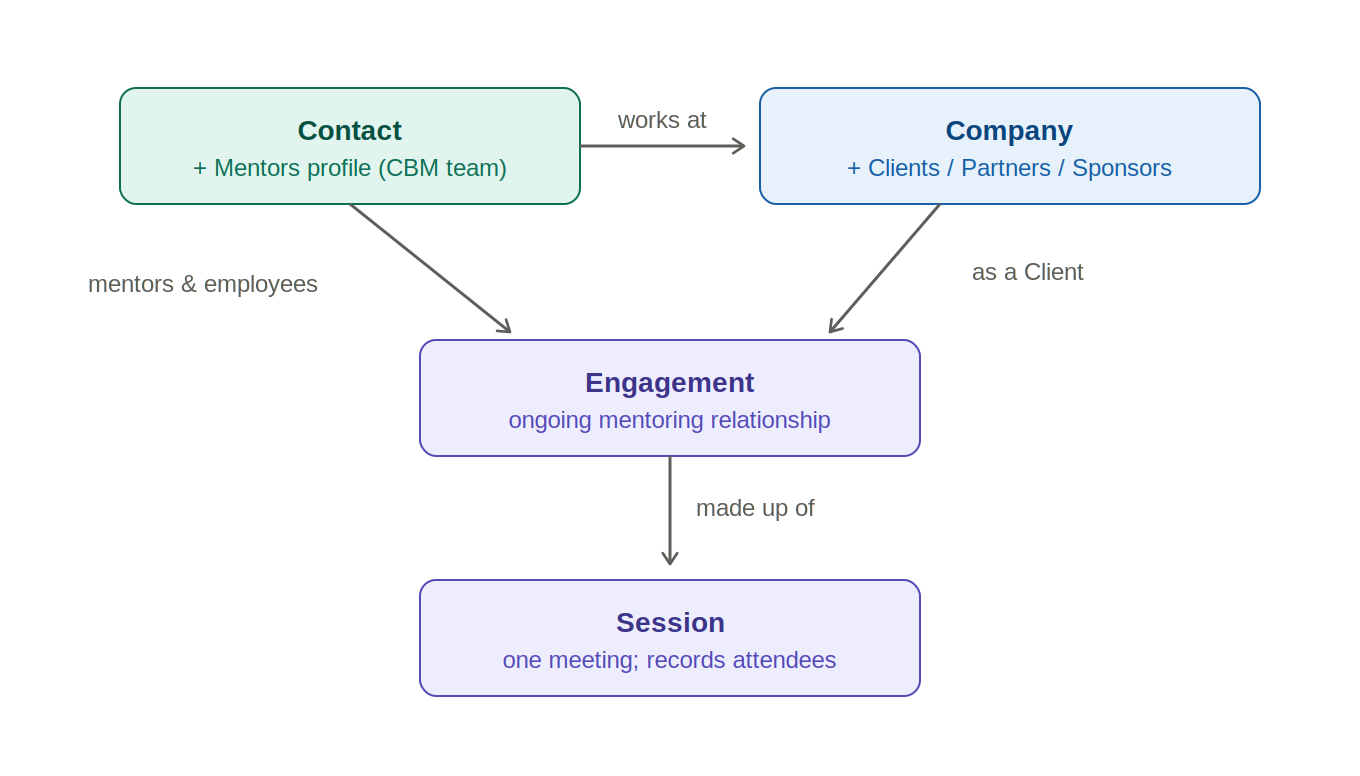
Putting it together. The whole picture reads in one line: a Company, acting as a Client, has one or more Engagements; each Engagement involves the client's employees and one or more CBM mentors; and each Engagement is made up of Sessions, each recording the employees who attended. Open an Engagement and you see the entire mentoring relationship in one place — the company, the people, the mentors, and every meeting.
In short. An Engagement is one mentoring relationship with a client company — an ongoing effort that spans many sessions — joining the employees being mentored with a primary mentor (and any co-mentors). Each Engagement is made up of Sessions, the individual meetings, and every Session records who attended.
Users and Access
A User is a login account. Everything so far has been about the information CONTACT holds. A User is different — it's the login account that lets a person actually get into the system and work. If you can sign in, you have a User account.
A User is not the same as a Contact. Every User is also a Contact — a person CBM knows — but the reverse isn't true: most Contacts are not Users. A client never logs in, so they're a Contact but not a User. And even a CBM team member may not be one: a retired mentor keeps their Contact and their Mentors profile, with their full history intact, but no longer has a User account, because they no longer need to sign in.
Your User account decides what you can see. This is the part worth holding onto. CONTACT grants access based on your User account — not on the fact that you're a mentor, and not simply because your name appears on a record. That's why two people can sign in and see different things, and why you might occasionally find your name on a record you can't open. Access follows the User; Section 6 explains how that shapes your view of the system.
In short. A Contact is the record of a person; a User is the login account that lets a person work in the system. Every User is a Contact, but most Contacts are not Users — and what you can see in the CONTACT is governed by your User account.
No comments to display
No comments to display