
Signing In
Before your first sign-in. Your CONTACT account is created for you by a CBM administrator — you don't set one up yourself. When your account is ready, the system sends you an email with a temporary password, which you'll be prompted to change the first time you log in. If you expected this email and it hasn't arrived, check your spam folder first, then email helpme@cbmentors.org.
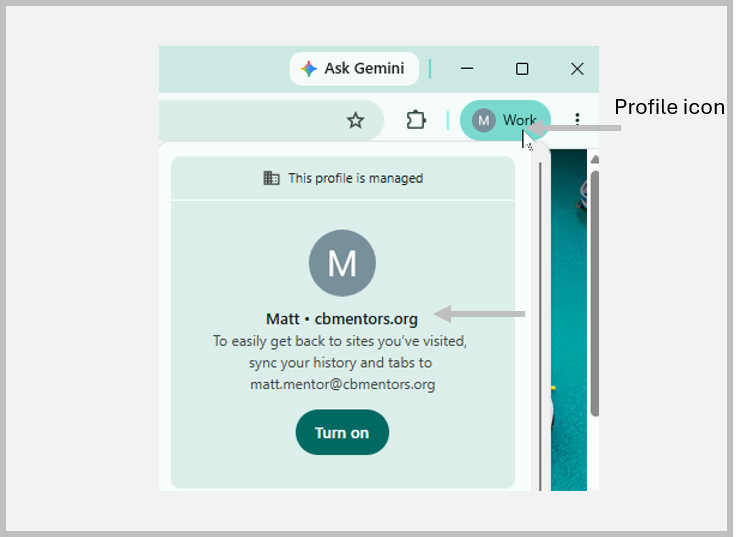
Before signing in to CONTACT, Open Chrome and ensure that you are in your CBM profile by clicking the profile icon in the top right corner of Chrome. Check that the screen shows your name and cbmentors.org.
Where to sign in. In Chrome, enter the following https://apps.clevelandbusinessmentors.org/ into the address bar. Bookmark this page so it's easy to return to. CONTACT works in any current web browser — Chrome, Edge, Firefox, or Safari — and runs best when your browser is kept up to date. We recommend using Chrome for your work within the CBM environment.
Signing in. On the sign-in screen, enter your username (Your CBM email address) and password, then select Log in. The screen you land on first depends on your role; that's expected, and the next section helps you get your bearings.
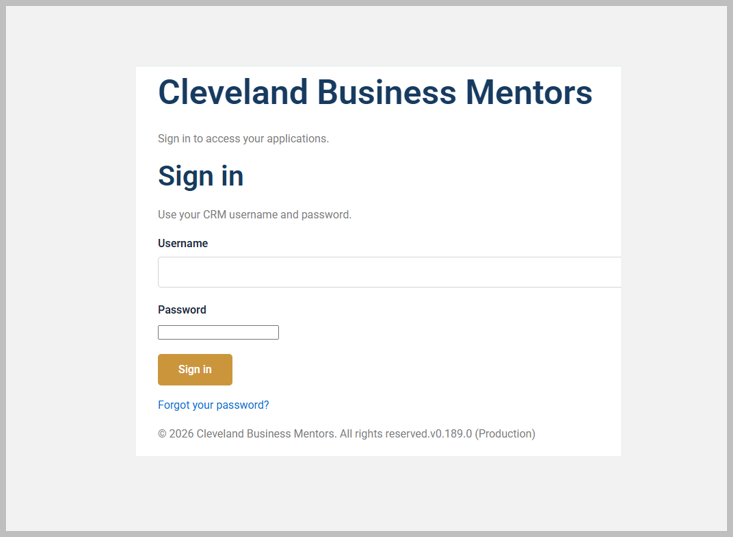
If you forget your password. use the Forgot your password option on the sign-in screen. If you are still having difficulty, email helpme@cbmentors.org for assistance.
Signing out, and a word on security. To sign out, click the Sign Out button at the top of your home screen. Because the CONTACT holds real information about real people, always log out when you're on a shared or public computer, and never share your login with anyone — if a colleague needs access, an administrator can create an account for them.